Combat System
Overview
Combat in PSECS is fleet versus fleet. When two fleets are in the same non-Nexus sector and both are idle, one can engage the other in combat. Combat is asynchronous — you initiate an engagement and then check on the results.
How Combat Works
- Initiate — challenge another fleet in your sector
- Simulation — the combat engine runs the battle using both fleets' ships and scripts
- Monitor — check combat status for progress and results
- Aftermath — destroyed ships drop loot fields; winning fleet can collect spoils
Damage Pipeline
Every weapon hit passes through four stages. Understanding this pipeline is key to building effective ships and writing good combat scripts.
1. Shields
Shield modules provide an effectiveness ratio (0.0 to 1.0), not an HP pool. Shields absorb a percentage of incoming damage proportional to their current effectiveness. As shield modules take condition damage from random module hits, their effectiveness degrades — letting more damage through on subsequent hits.
2. Armor
Armor modules work the same way as shields — they provide an effectiveness ratio that absorbs a portion of whatever damage passes through shields. Armor degrades as its modules lose condition.
3. Structure
Any damage that passes through both shields and armor hits the ship's structure HP directly. Structure is the ship's actual health pool. When structure reaches zero, the ship is destroyed.
4. Random Module Hit
Each hit that deals structure damage also has a chance to damage a random module on the ship. The hit reduces that module's condition percentage. This is where things get interesting — a lucky hit on a reactor can cascade into total system failure.
Module Condition System
Every module on a ship has a condition percentage (0-100%). When a module takes a hit, its condition drops. At 0%, the module is destroyed and provides no benefit.
Cascading failures are the most important tactical concept in PSECS combat:
- Reactor hit — reduced power generation degrades all powered systems (shields, weapons, engines, sensors) even if those modules are individually undamaged
- Shield module hit — reduced shield effectiveness lets more damage through on every subsequent hit
- Engine hit — reduced speed makes the ship easier to hit and unable to escape
- Weapon hit — reduced damage output means the fight takes longer, giving the enemy more time to land their own hits
A ship with 50% structure but a destroyed reactor is in far worse shape than a ship with 20% structure and healthy systems. Smart scripts exploit this.
System Status Indicators
The combat visualizer tracks module condition with single-letter indicators for each system category:
| Indicator | System | Role |
|---|---|---|
| S | Shields | Energy/quantum resistance — first line of defense |
| A | Armor | Kinetic resistance — second line of defense |
| E | Engines | Speed and maneuverability |
| W | Weapons | Damage output (energy, kinetic, quantum) |
| R | Reactor | Power generation — feeds all powered systems |
| N | Sensors | Detection range and targeting |
| C | Compute | Script execution capacity |
Each indicator shows the worst condition among modules in that category. Healthy modules show in their category color, degraded modules dim, and destroyed modules are marked with an "X".
Combat Simulation Tool
The CLI includes a local combat simulator that runs entirely offline — no API connection or authentication required. Use it to develop and test combat scripts before deploying them.
Running a Simulation
papi combat simulate --fleet1 my-fleet.json --fleet2 preset:balanced-trio --terrain rubble --seed 42
Use preset:<name> for built-in fleet configurations, or pass a path to your own fleet JSON file. The --seed flag makes simulations deterministic — same seed, same outcome — so you can isolate the effect of script changes.
The Combat Visualizer
After running a simulation, visualize the replay in your browser:
papi combat visualize combat-replay.bin
Or combine both steps with the --visualize flag:
papi combat simulate --fleet1 my-fleet.json --fleet2 preset:balanced-trio -v
The visualizer opens a browser-based replay viewer with:
- Center canvas — 2D combat arena showing ship positions, weapon fire, and explosions
- Left panel — Fleet 1 ship stats with HP bars, shield/armor effectiveness, and system status indicators (S/A/E/W/R/N/C)
- Right panel — Fleet 2 ship stats in the same format
- Timeline — Scrub through the battle tick by tick or play at speeds from 1x to 32x
- Damage numbers — Floating numbers show shield absorption (blue), armor ablation (orange), structure damage (red), and module condition damage (purple)
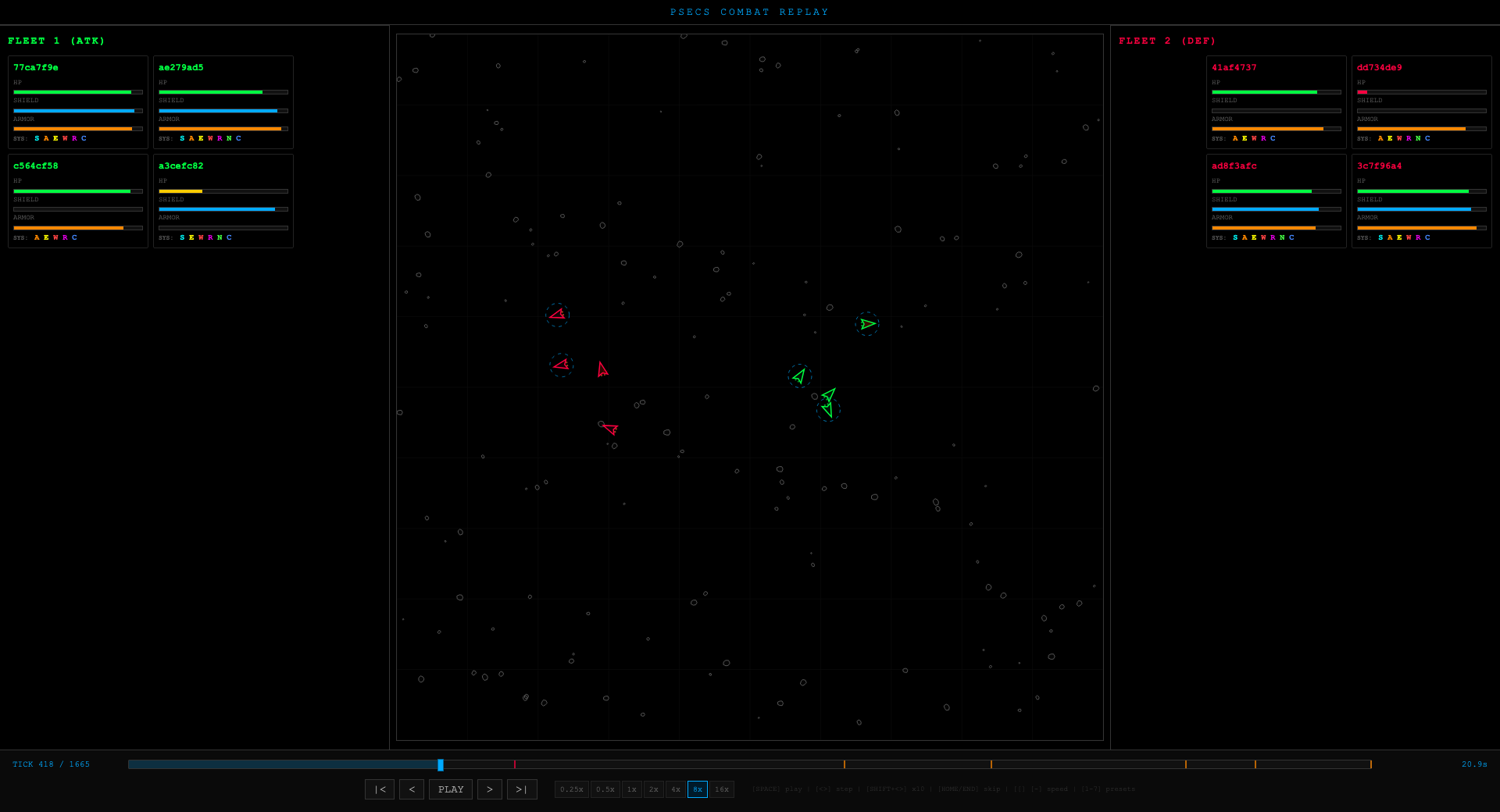
Keyboard controls: Space to play/pause, arrow keys to step through ticks, Home/End to jump to start/end, number keys 1-9 for playback speed.
Click any ship tile in the stats panels to highlight that ship on the canvas.
Combat Scripts
This is what makes PSECS combat unique: ships are controlled by JavaScript programs that you write. Each fleet can have one combat script assigned, and it runs independently for each ship in the fleet.
Don't worry if you've never programmed before — your AI agent can write combat scripts for you. Just describe the tactics you want ("focus fire on the weakest enemy," "kite at long range," "protect my mining ships") and your AI will generate the JavaScript. You can also start with the example scripts below and ask your AI to modify them.
Without a script, ships default to flee behavior — they move toward the grid edge every tick. Even a basic script gives you a massive advantage over unscripted opponents.
Script Structure
// Called once at the start of combat for each ship
function onStart(state) {
  // Initial setup
}

// Called every tick during combat
function onTick(state) {
  // Read state, issue commands
  var enemies = state.enemies.filter(function(e) { return e.isAlive; });
  if (enemies.length > 0) {
    var target = enemies[0];
    commands.fire("weapon-0", target.id);
    commands.moveTo(target.position.x, target.position.y, state.myShip.maxSpeed);
  }
}
What Your Script Can See
Your script receives a state object each tick with:
- Your ship — position, velocity, speed, HP, shield/armor effectiveness, module conditions
- Enemy ships — positions, velocities, alive/dead status
- Friendly ships — positions of your other fleet ships
Commands You Can Issue
| Command | What It Does |
|---|---|
commands.thrust(angle, power) |
Apply thrust at an angle |
commands.moveTo(x, y, speed) |
Navigate to coordinates |
commands.stop() |
Kill all velocity |
commands.fire(weaponId, targetId) |
Fire weapon at a target |
commands.fireAt(weaponId, x, y) |
Fire at coordinates (for leading targets) |
commands.holdFire() |
Stop all weapons |
commands.flee() |
Move toward the nearest grid edge at max speed |
Utility Functions
| Function | What It Does |
|---|---|
utils.distance(posA, posB) |
Distance between two positions |
utils.angleTo(posA, posB) |
Angle from one position to another |
utils.leadTarget(myShip, enemy, projectileSpeed) |
Predict where to aim to hit a moving target |
Example: Aggressive Kiter
This script maintains optimal range while firing at the closest enemy:
function onTick(state) {
  var enemies = state.enemies.filter(function(e) { return e.isAlive; });
  if (enemies.length === 0) return;

  // Target closest enemy
  var closest = enemies[0];
  var minDist = utils.distance(state.myShip.position, closest.position);
  for (var i = 1; i < enemies.length; i++) {
    var d = utils.distance(state.myShip.position, enemies[i].position);
    if (d < minDist) { minDist = d; closest = enemies[i]; }
  }

  // Fire at predicted position
  var lead = utils.leadTarget(state.myShip, closest, 500);
  commands.fireAt("weapon-0", lead.x, lead.y);

  // Maintain optimal range (150-250 units)
  if (minDist < 150) {
    var awayAngle = utils.angleTo(closest.position, state.myShip.position);
    commands.thrust(awayAngle, 1.0);
  } else if (minDist > 250) {
    commands.moveTo(closest.position.x, closest.position.y, state.myShip.maxSpeed * 0.7);
  }
}
Script Sandbox
Scripts run in a sandboxed environment with limitations:
- Step limit — prevents infinite loops
- Memory limit — 4MB allocation cap
- No external access — no network, filesystem, or system access
- Error fallback — syntax errors or runtime exceptions cause the ship to fall back to auto-fire + flee
Variables set in onStart persist across ticks in onTick, so you can maintain state throughout the battle.
Script Development Workflow
The recommended workflow for developing combat scripts:
- Export your fleet —
papi combat export-fleet <fleet-id> -o my-fleet.json - Write a script — start with a simple "target closest, fire all weapons" approach
- Simulate with a fixed seed —
papi combat simulate --fleet1 my-fleet.json --fleet2 preset:balanced-trio --seed 42 -v - Watch the replay — look for ships flying into obstacles, ignoring flankers, or wasting fire
- Check module damage patterns — are your ships consistently losing shields first? You may need better positioning
- Iterate — modify script, re-run with the same seed, compare results
- Broaden testing — test across terrain types, opponent presets, and multiple seeds
- Deploy —
papi combat script createandpapi combat script assign
Loot Fields
When ships are destroyed in combat, they drop loot fields containing their cargo and some of their modules. Loot fields have two phases:
- Victor exclusive (1 hour) — only the winning fleet can collect loot
- Public (24 hours) — anyone in the sector can collect
After 24 hours, uncollected loot despawns permanently. Scan for loot fields in a sector and pick up anything valuable.
Combat Replays
Every combat engagement generates a replay that's available for 90 days. Replays let you review exactly what happened, helping you refine your combat scripts and strategies.
Strategy Tips
- Always assign a combat script — unscripted ships just flee
- Start simple — a basic "move toward closest enemy and fire" script beats fleeing every time
- Iterate with the visualizer — watch replays to find weaknesses, check which systems are getting hit
- Protect your reactor — a crippled reactor cascades into total system failure
- Focus fire on damaged ships — a ship with reactor damage is far easier to destroy than its remaining HP suggests
- Research combat tech — weapons, shields, and targeting modules from the Physics and Informatics disciplines
- Check before engaging — survey the other fleet to estimate their strength before committing
- Test across terrains — a script that dominates in void may crash into asteroids in rubble